
Rosette Nebula in HaRGB
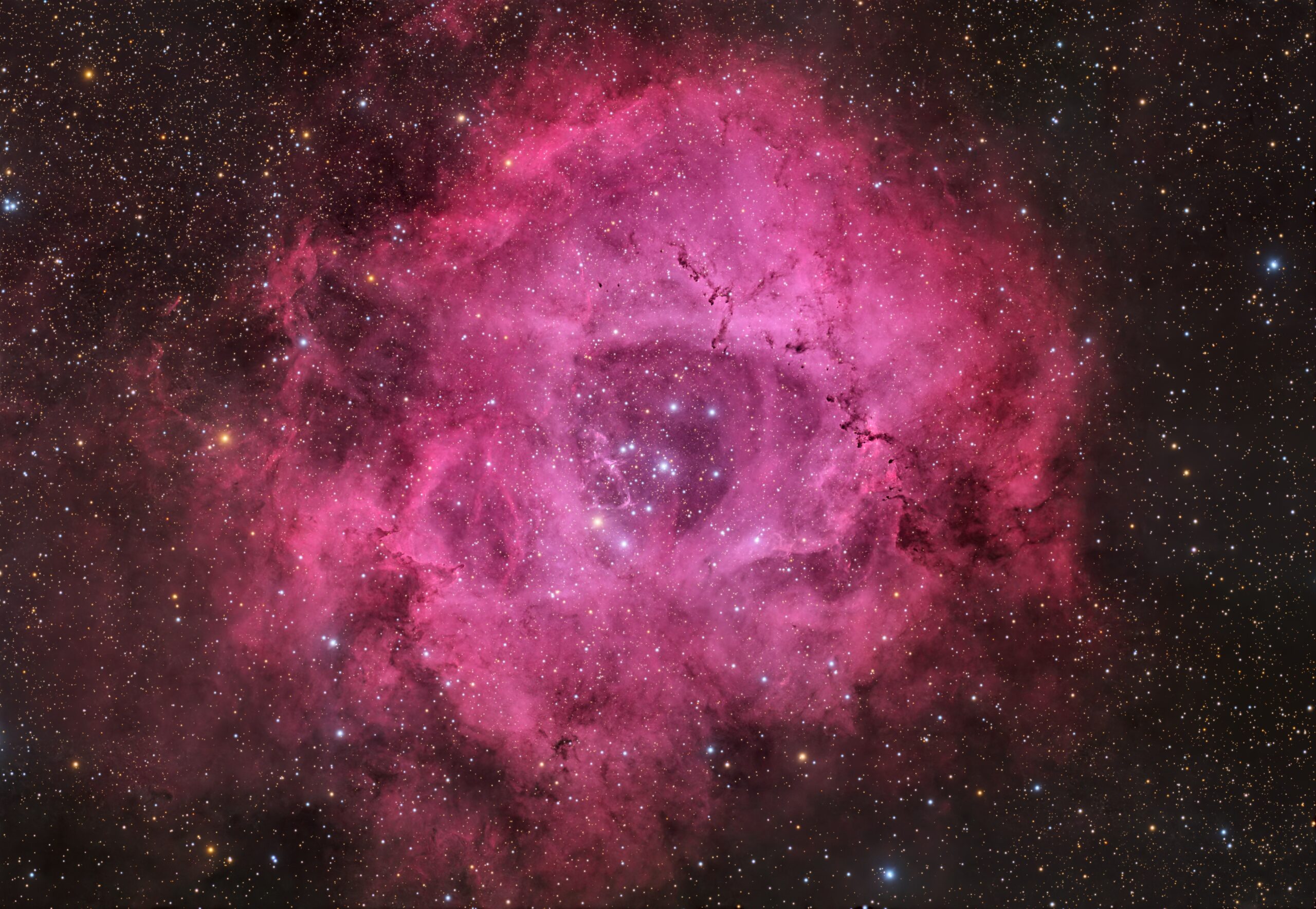 Click image for full size version
December 26, 2025
This gorgeous donut is the Rosette Nebula. It’s very large and diffuse, and contains open cluster NGC 2244, which is in the darker centre of the nebula. The Rosette lies about 5,200 light years away in the constellation Monoceros, and is about 50 light years across. This gives it an apparent width about three times that of the full Moon. This nebula is a star nursery, with about 2,500 young stars estimated to be within it, and a total mass about 10,000 times the Sun’s. The young stars were formed from the gas and dust in the Rosette, and are now causing the gas to glow, absorbing invisible infrared star light and emitting it mostly as red and blue light that we can see.
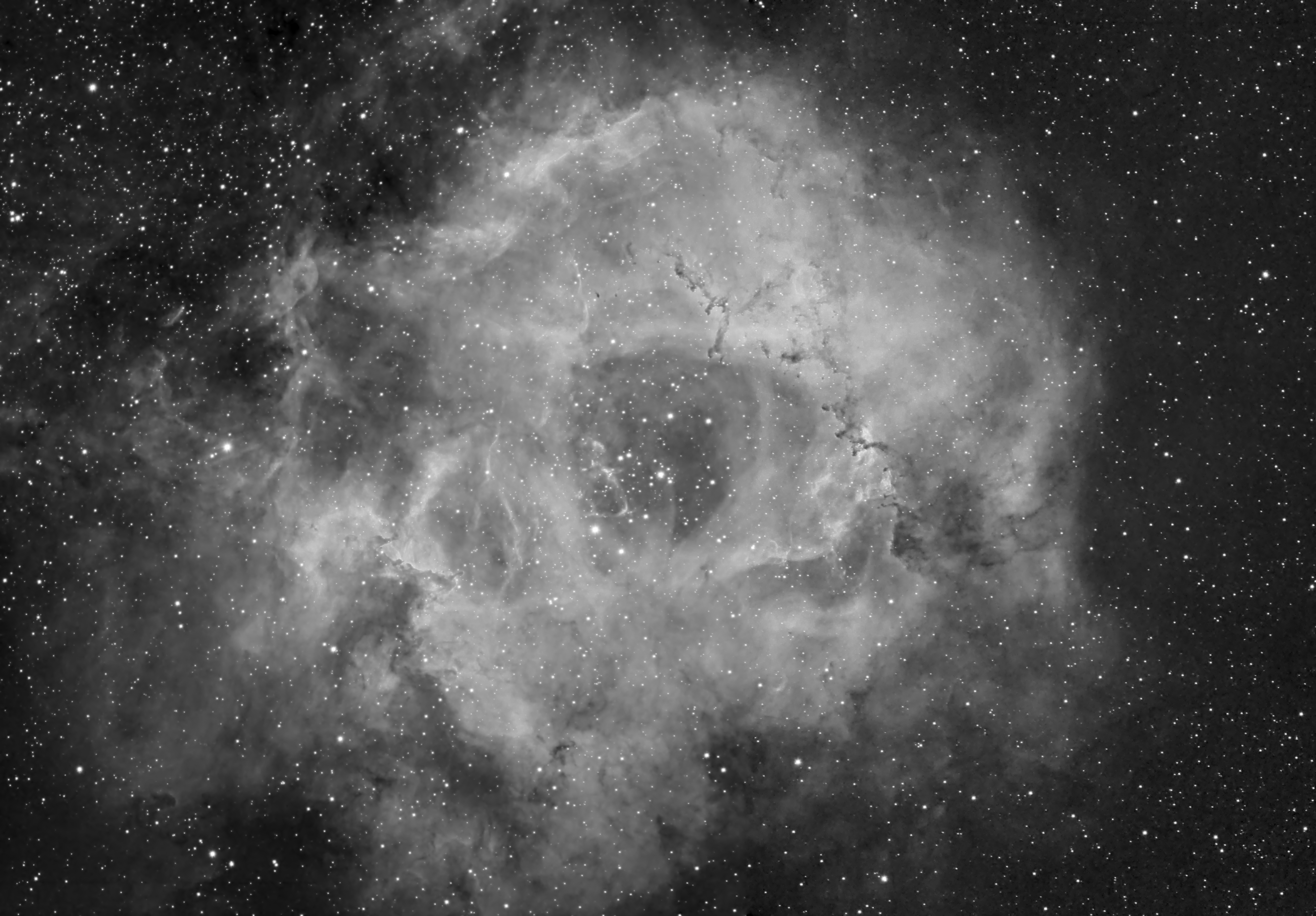 In making this image, I had to make a 2-pane mosaic for the Ha data, since the field of view couldn’t capture the entire object. The Ha mosaic is shown at left. Click the pic for full res view.
This is a reprocessing of data captured in 2021 using new techniques and improved skills. The original version from 2021 is available here if you want to compare.
Tekkies:
Acquisition, focusing, and control of Paramount MX mount with CCD Commander and TheSkyX. Focus with Optec DirectSync motor and controller. Equipment control with Primalucelab EAGLE 3 Pro computer. All pre-processing and processing in PixInsight. Acquired from my SkyShed in Guelph. Average or better transparency and seeing. Data acquired February 3 – March 7, 2021.
Luminance: Sky-Watcher Esprit 150 f/7 refractor and QHY16200M camera with Optolong 7nm H-alpha filter
Chrominance: Takahashi FSQ-106 ED IV @ f/5 and QHY367C Pro one-shot colour camera with Optolong UV/IR filter
Data Reduction and Initial Processing
Preprocessing: The WeightedBatchPreProcessing script was used to create H-alpha master frames from the mono camera and an RGB master frame from the one-shot colour camera. DrizzleIntegration (2x CFA Drizzle) was applied to the RGB set. Edge artifacts were cropped with DynamicCrop and DBE was applied to each of the three masters using Subtraction. ColorCalibration was applied to the RGB Image.
Mosaic Creation for H-alpha: Masters for both H-alpha panes were cropped to remove edge artifacts and processed separately with DBE. ImageRegistration was used in mosaic/union mode to make a mosaic template. StarAlignment was used to align each pane to the template. GradientMergeMosaic was used to merge Pane 1 and Pane 2 of each channel. Edge artifacts were cropped.
Deconvolution: BlurXterminator was applied to both the RGB and Ha masters with a star reduction abount of 0.5 and non-stellar sharpening of 0.9.
Colour
Lightness extraction: ChannelExtraction was used to extract the lightness channel from the RGB image.
Stretching and Recombination: The VeraLux script was applied to the RGB image make a pleasing yet bright image. HistogramTransformation was applied the extracted lightness channel to make a pleasing, bright image with a background brightness of around 0.1. The lightness of the RGB master was replaced with the extracted and stretched lightness channel using LRGBCombination.
H-alpha
Stretching: HistogramTransformation was applied to make a pleasing, bright image, with background set to an intensity of approximately 0.10.
Combining H-alpha and Colour Images
H-alpha Blending: Jurgen Turpe’s CombineHaWithRGB script was used to combine the H-alpha and RGB images.
Additional Processing
Star Removal: StarXterminator was used to remove the stars from both masters, with default settings. Only the RGB stars-only image was preserved.
Nonlinear Noise Reduction: NoiseXterminator was applied the master image, which was then stretched a little further with HistogramTransformation.
Contrast Enhancement: LocalHistogramEqualization was applied using an inverted star mask to protect the stars (scale 150, max contrast 1.5, strength 0.18, 1 iteration, followed by scale 150, max contrast 1.5, strength 0.25).
Sharpening: MultiscaleMedianTransform was used to sharpen Layers 2 and 3 with strengths of 0.02 and 0.03, respectively. A mask was used to select just the bright parts of the nebula for sharpening.
Star Processing and Restoration: HistogramTransformation was used to further stretch the stars-only RGB image, followed by CurvesTransformation through a star mask to boost saturation using the Saturation slider. The stars were added back into the master HaLRGB image using the PixelMath expression combine(starless, stars, op_screen()).
Final Steps: The DarkStructureEnhance script was applied with a strength of 0.2. Background, nebula and star brightness, contrast and saturation were adjusted in several iterations using CurvesTransformation with masks as required. ICCProfileTransformation (sRGB IEC61966-2.1; Relative Colorimetric with black point compensation) was applied prior to saving as a jpg. The FindingChart process was used to create the finder chart.

Leave A Comment